
Addon Developer Guide
Complete reference for building addons for SNetworks PHP Classifieds. WordPress-style hooks, per-theme templates, admin pages, and full API documentation.
Overview
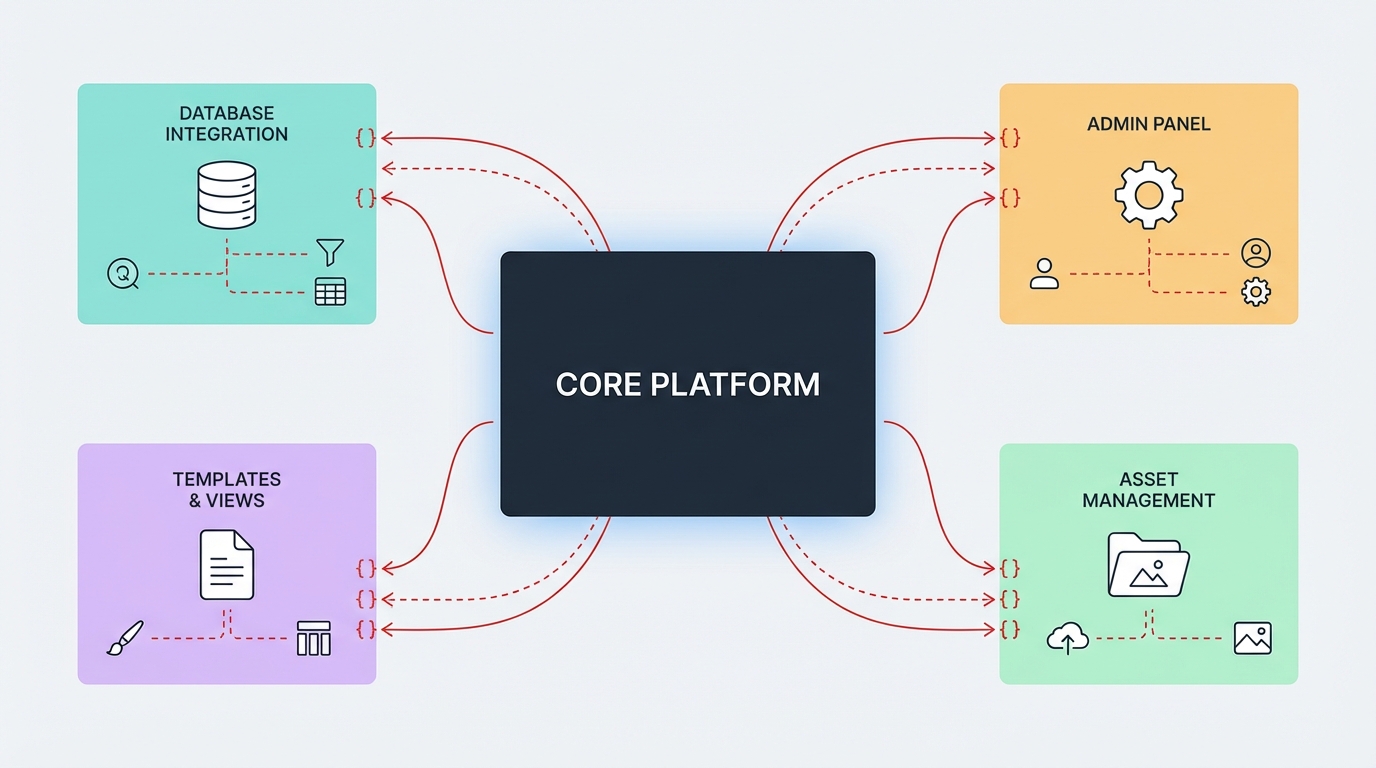
The SNetworks addon system provides a WordPress-style architecture for extending the classifieds platform without modifying core files.
The SNetworks addon system provides a WordPress-style architecture for extending the classifieds platform without modifying core files. Addons can:
- Hook into template rendering at predefined points
- Register CSS and JavaScript assets
- Add admin panel pages accessible from the sidebar
- Create and manage custom database tables
- Provide theme-specific templates for each supported theme
- Be installed via ZIP upload or manual folder placement
The system consists of three core components:
- addon-hooks.inc.php — The hook/action/filter engine
- addon-manager.cls.php — Discovery, lifecycle management, ZIP upload
- admin/addons.php — Admin UI for managing addons
Getting Started
Minimum requirements, quick-start walkthrough, and your first working addon in five steps.
Minimum Requirements
- SNetworks PHP Classifieds v6.5.2 or later
- PHP 7.4+ (8.3 recommended)
- Write access to the
addons/directory
Quick Start
- Create a directory inside
addons/with your addon ID as the folder name - Create a manifest file
addon.jsonwith id, name, version, description, author, themes - Create the entry point
main.phpwith an action hook - Go to Admin > Addons > Manage Addons and click Activate
- Visit any page to see your addon in action
{
    "id": "my-first-addon",
    "name": "My First Addon",
    "version": "1.0.0",
    "description": "A simple addon to learn the system",
    "author": "Your Name",
    "themes": ["backpage", "snet-phoenix"]
}<?php
add_action('content_before', function() {
echo '<div style="background:#ffe;padding:8px;text-align:center;">Hello from My First Addon!</div>';
});Addon Directory Structure
Required and optional files, folder conventions, and how the addon loader discovers your code.
addons/
  my-addon/
    addon.json              # Required — manifest file
    main.php                # Required — entry point, loaded when addon is active
    install.php             # Optional — runs on first activation
    update.php              # Optional — runs on version upgrade (v6.5.4+)
    uninstall.php           # Optional — runs when addon is uninstalled
    admin/                  # Optional — admin page files
      settings.php          #   Wrapped inside admin chrome automatically
      reports.php
    templates/              # Optional — per-theme template parts
      backpage/             #   Templates for the backpage theme
        my-widget.php
        sidebar.php
      snet-phoenix/         #   Templates for the snet-phoenix theme
        my-widget.php
        sidebar.php
    assets/                 # Optional — static files (publicly accessible)
      css/
        styles.css
      js/
        app.js
      images/
        icon.png
Important Notes
- The folder name MUST match the
idfield inaddon.json - Only files inside
assets/are directly accessible via HTTP - All PHP files are protected from direct access by
addons/.htaccess - Templates must be organized by theme name (matching the directory name in
themes/)
The Manifest File (addon.json)
Every addon requires an addon.json in its root directory. This section documents the full schema and validation rules.
Full Schema
{
    "id": "my-addon",
    "name": "Human-Readable Name",
    "version": "1.0.0",
    "description": "A one-line description of what this addon does.",
    "author": "Author Name",
    "author_url": "https://example.com",
    "min_app_version": "6.5.2",
    "themes": ["backpage", "snet-phoenix"],
    "admin_pages": [
        {
            "slug": "settings",
            "title": "My Addon Settings",
            "file": "admin/settings.php"
        }
    ],
    "on_install": "install.php",
    "on_update": "update.php",
    "on_uninstall": "uninstall.php"
}
Field Reference
| Field | Required | Type | Description |
|---|---|---|---|
| id | Yes | string | Unique identifier. Must match folder name. Allowed characters: lowercase a-z, digits 0-9, hyphens -. Cannot start with a hyphen. |
| name | Yes | string | Display name shown in the admin panel. |
| version | Yes | string | Semantic version (e.g., "1.0.0", "2.1.3"). |
| description | No | string | Short description shown in admin panel. |
| author | No | string | Author name displayed in addon listing. |
| author_url | No | string | URL to author's website. If provided, author name becomes a link. |
| min_app_version | No | string | Minimum SNetworks version required (informational). |
| themes | No | array | List of supported theme directory names (e.g., ["backpage", "snet-phoenix"]). Displayed in admin listing. |
| admin_pages | No | array | Array of admin page definitions (see Admin Pages section). |
| on_install | No | string | Path to install script relative to addon root. Defaults to install.php. |
| on_update | No | string | Path to update script relative to addon root. Defaults to update.php. Runs on version upgrade (v6.5.4+). |
| on_uninstall | No | string | Path to uninstall script relative to addon root. Defaults to uninstall.php. |
ID Naming Rules
The addon ID is used as the directory name inside addons/, the database identifier in clf_addons, and the first parameter of addon_template(), addon_enqueue_css(), and addon_enqueue_js().
Validation regex: /^[a-z0-9][-a-z0-9]*$/
- Valid:
my-addon,email-blocker,ad-navigation,stats2 - Invalid:
My_Addon,my addon,-starts-with-hyphen,UPPERCASE
The Entry Point (main.php)
When an addon is activated, main.php is included once during the bootstrap phase. This is where you register hooks, enqueue assets, and define callbacks.
Execution Timing
main.php runs at a specific point in the bootstrap sequence. All global variables are available and you can safely register hooks and enqueue assets.
- After database connection is established
- After
$xtheme(active theme) is set - After session initialization
- After core globals (
$xview,$xadid,$xsubcatid, etc.) are populated - Before page output begins
Typical main.php Structure
<?php
/**
* My Addon — main entry point
*/
// 1. Enqueue assets (must be done here, before head_styles/footer_scripts fire)
addon_enqueue_css('my-addon', 'css/styles.css');
addon_enqueue_js('my-addon', 'js/app.js');
// 2. Register action hooks
add_action('header_nav_end', 'myaddon_header_button');
add_action('showad_after_title', 'myaddon_show_widget');
add_action('footer_links', 'myaddon_footer_link');
// 3. Register filter hooks (if any)
// add_filter('some_filter', 'myaddon_filter_value');
// 4. Define callback functions
function myaddon_header_button()
{
echo '<li><a href="/my-page">My Feature</a></li>';
}
function myaddon_show_widget()
{
global $xadid, $xsubcatid;
if (!$xadid) return;
// Use per-theme templates for proper styling
addon_template('my-addon', 'widget', array(
'ad_id' => $xadid,
'data' => 'some value',
));
}
function myaddon_footer_link()
{
echo '<span class="sep">·</span> <a href="/my-page">My Addon</a>';
}Do's and Don'ts
Do:
- Prefix all function names with your addon ID to avoid collisions (e.g.,
myaddon_render) - Check context before rendering (e.g.,
if ($xview !== 'showad') return;) - Use
addon_template()for HTML output to support multiple themes - Enqueue assets at the top level, not inside callbacks
Don't:
- Output HTML directly at the top level of
main.php(it will appear on every page) - Use generic function names that could collide (e.g.,
render(),init()) - Modify core global variables
- Include files from outside your addon directory
Action Hooks
Actions allow your addon to execute code at specific points in the page lifecycle. They are "fire and forget" — your callback runs and any output is echoed in place.
Registering an Action
add_action($hook_name, $callback, $priority);| Parameter | Type | Default | Description |
|---|---|---|---|
| $hook_name | string | — | The hook to attach to (e.g., 'showad_after_title') |
| $callback | callable | — | Function name (string), closure, or [object, 'method'] |
| $priority | int | 10 | Execution order. Lower numbers run first. |
Priority System
When multiple callbacks are registered for the same hook, they execute in priority order:
add_action('content_before', 'run_second', 20);
add_action('content_before', 'run_first', 5);
add_action('content_before', 'run_also_second', 20);  // Same priority = order of registration
Execution order: run_first (5) → run_second (20) → run_also_second (20)
Callback Types
// Named function
add_action('header_nav_end', 'my_function');
// Anonymous function (closure)
add_action('footer_links', function() {
echo '<span class="sep">·</span> <a href="#">Link</a>';
});
// Object method
add_action('content_before', array($myObject, 'renderBanner'));Checking if a Hook Has Callbacks
if (has_action('showad_after_title'))
{
    // At least one addon is hooked into showad_after_title
}Filter Hooks
Filters allow your addon to modify a value as it passes through the system. Unlike actions, filters receive a value, transform it, and must return the result.
Registering a Filter
add_filter($hook_name, $callback, $priority);Applying a Filter
For theme or core developers who want to make a value filterable:
$title = apply_filters('ad_title', $original_title);
$price = apply_filters('ad_price_display', $price, $currency, $post);
Writing a Filter Callback
Your callback receives the current value as the first parameter and must return a value:
add_filter('ad_title', function($title) {
    return strtoupper($title);  // Must return the modified value
});

// With additional arguments
add_filter('ad_price_display', function($price, $currency, $post) {
    if ($price == 0) return 'Free';
    return $currency . number_format($price, 2);
}, 10);
Checking if a Filter Has Callbacks
if (has_filter('ad_title'))
{
    $title = apply_filters('ad_title', $title);
}
Note
The core system currently uses action hooks at template hook points. Filter hooks are available for addon-to-addon communication or for future core integration.
Available Hook Points
All 19 do_action() hook points available in the template system, organized by page area. They are identical in both themes unless noted.
Layout Hooks (_layout.php)
These fire on every page and are the most commonly used hooks.
| Hook | Location | Typical Use |
|---|---|---|
| head_styles | After theme CSS <link> tags, before </head> | Addon CSS (use addon_enqueue_css() instead) |
| head_scripts | After theme JS <script> tags, before </head> | Addon head JS |
| header_before | Before the header include | Announcement bars, notices |
| header_after | After the header include | Account bars, sub-navigation |
| content_before | Before <?php echo $content; ?> | Page-wide banners, alerts |
| content_after | After <?php echo $content; ?> | Page-wide widgets, CTAs |
| footer_before | Before the footer include | Pre-footer widgets |
| footer_scripts | Before </body> | Addon JS (use addon_enqueue_js() instead) |
Header Hooks (parts/header.php)
| Hook | Location | Typical Use |
|---|---|---|
| header_nav_end | After the last navigation item in the header menu | Account links, extra nav buttons |
Backpage context: Inside .bp-header-actions, after the "My Account" button.
Phoenix context: Inside .nav.navbar-nav.navbar-right, after the location dropdown <li>.
Footer Hooks (parts/footer.php)
| Hook | Location | Typical Use |
|---|---|---|
| footer_links | After Terms/Privacy links, inside the footer links area | Extra footer links |
Homepage Hooks (main.php)
| Hook | Location | Typical Use |
|---|---|---|
| main_before_categories | Before the categories grid | Featured banners, announcements |
| main_after_categories | After the categories grid | Promotional content, ads |
Ad Detail Page Hooks (showad.php)
| Hook | Location | Typical Use |
|---|---|---|
| showad_before_title | Before the ad title header | Badges, status indicators |
| showad_after_title | After the title and subtitle | Next/prev navigation, breadcrumbs |
| showad_before_details | Before the ad description text | Warnings, disclaimers |
| showad_after_details | After the ad description text | Related ads, recommendations |
| showad_after_contact | After the contact form section | Additional contact options, maps |
Tip
The $post argument is passed in the backpage theme. In snet-phoenix, $post is available as a global instead. Always use global $post; in your callback for cross-theme compatibility.
Ad Listing Page Hooks (ads.php)
| Hook | Location | Typical Use |
|---|---|---|
| ads_before_listing | Before the ad listing grid | Filters, sorting controls |
| ads_after_listing | After the listing and pagination | Load more buttons, suggestions |
Cross-Theme Compatibility Note
When writing callbacks for showad_* hooks, always access data via globals rather than relying on hook arguments:
function my_showad_callback()
{
    // GOOD: Works in both themes
    global $xadid, $xsubcatid, $xad, $post;

    // AVOID: Only works in backpage (passes $post as argument)
    // function my_showad_callback($post) { ... }
}Per-Theme Templates
Since each theme has different HTML structure and CSS classes, addons must provide separate templates for each supported theme.
Directory Layout
addons/my-addon/templates/
  backpage/
    widget.php
    sidebar.php
  snet-phoenix/
    widget.php
    sidebar.php
Rendering a Template
From your hook callback:
addon_template('my-addon', 'widget', array(
    'items'    => $items,
    'show_all' => true,
    'ad_id'    => $xadid,
));
The function addon_template($addon_id, $template_name, $vars):
- Looks for
addons/{addon_id}/templates/{current_theme}/{template_name}.php - If not found, falls back to the first available theme directory
- Extracts
$varsinto the template's local scope - Makes all global variables available in the template scope
- Includes the template file
Writing Template Files
Templates have access to all variables passed in the $vars array (extracted into local scope), all global variables, and all output helper functions (out(), outlang(), etc.).
<div class="bp-my-widget">
    <h3>My Widget</h3>
    <?php if ($show_all): ?>
        <ul>
        <?php foreach ($items as $item): ?>
            <li><a href="<?php out($item['url']); ?>"><?php out($item['title']); ?></a></li>
        <?php endforeach; ?>
        </ul>
    <?php endif; ?>
</div><div class="panel panel-default">
<div class="panel-heading">My Widget</div>
<div class="panel-body">
<?php if ($show_all): ?>
<div class="list-group">
<?php foreach ($items as $item): ?>
<a href="<?php out($item['url']); ?>" class="list-group-item">
<?php out($item['title']); ?>
</a>
<?php endforeach; ?>
</div>
<?php endif; ?>
</div>
</div>Theme Detection
If you need to know the current theme in your callback (e.g., to output theme-specific inline markup):
global $xtheme;
if ($xtheme === 'backpage') {
    // Backpage-specific logic
}Enqueueing CSS and JavaScript
Register CSS and JavaScript assets so they are automatically included in the page head and footer respectively.
CSS
Call addon_enqueue_css() at the top level of main.php (not inside a callback):
addon_enqueue_css('my-addon', 'css/styles.css');This registers a <link> tag on the head_styles hook. The path is relative to your addon's assets/ directory: addons/my-addon/assets/css/styles.css
The generated HTML:
<link rel="stylesheet" href="https://yoursite.com/addons/my-addon/assets/css/styles.css"/>JavaScript
Call addon_enqueue_js() at the top level of main.php:
addon_enqueue_js('my-addon', 'js/app.js');This registers a <script> tag on the footer_scripts hook (before </body>). The path is relative to assets/: addons/my-addon/assets/js/app.js
Multiple Assets
addon_enqueue_css('my-addon', 'css/styles.css');
addon_enqueue_css('my-addon', 'css/responsive.css');
addon_enqueue_js('my-addon', 'js/vendor/library.min.js');
addon_enqueue_js('my-addon', 'js/app.js');
Inline Scripts
For small amounts of inline JavaScript, use the footer_scripts hook directly:
add_action('footer_scripts', function() {
    echo '<script>console.log("My addon loaded");</script>' . "\n";
});
Conditional Loading
To load assets only on certain pages:
add_action('head_styles', function() {
    global $xview;
    if ($xview === 'showad') {
        $url = absurl('addons/my-addon/assets/css/showad-only.css');
        echo '<link rel="stylesheet" href="' . htmlspecialchars($url) . '"/>' . "\n";
    }
});Admin Pages
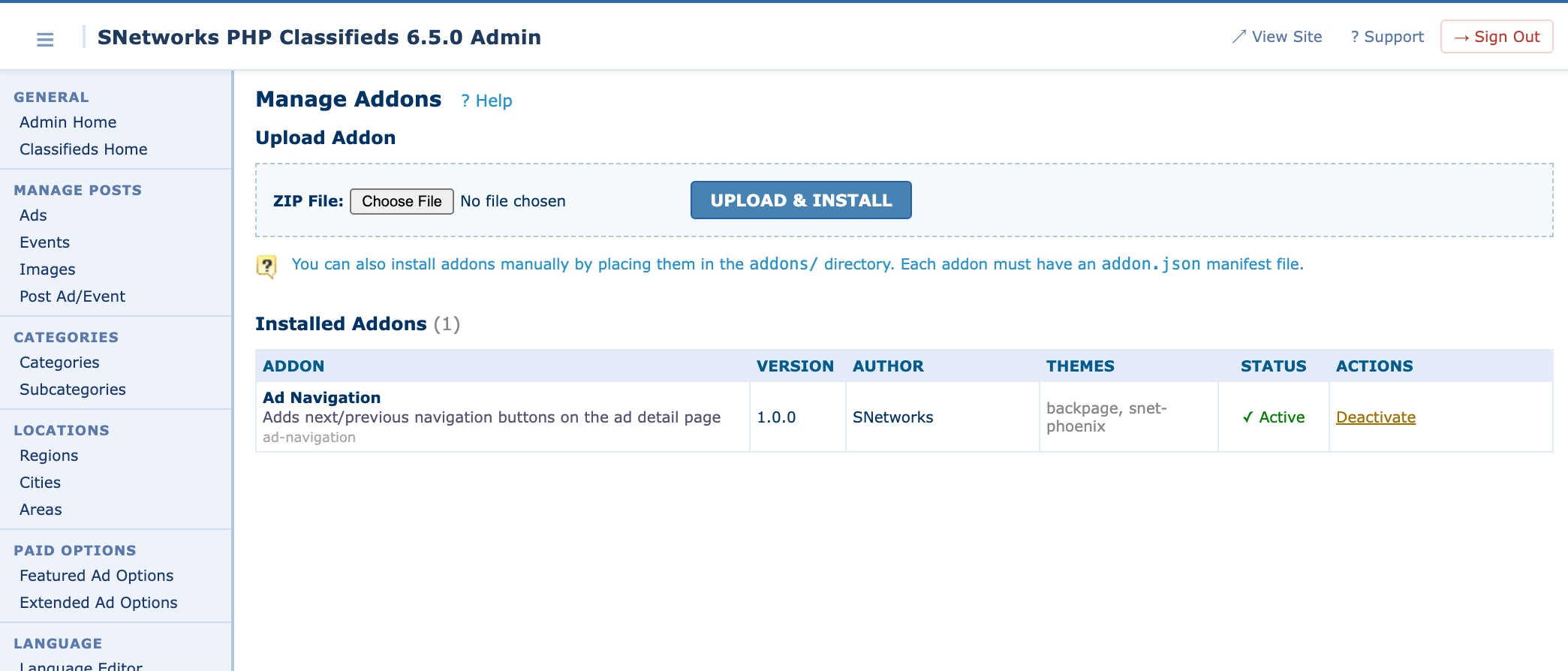
Addons can register their own admin pages that appear in the admin sidebar under the "Addons" section.
Registering Admin Pages
In addon.json:
{
    "admin_pages": [
        {
            "slug": "settings",
            "title": "My Addon Settings",
            "file": "admin/settings.php"
        },
        {
            "slug": "reports",
            "title": "Reports",
            "file": "admin/reports.php"
        }
    ]
}| Field | Description |
|---|---|
| slug | URL identifier for the page (used in ?page= parameter) |
| title | Display text in the admin sidebar menu |
| file | Path to the PHP file, relative to addon root |
How Admin Pages Work
When someone clicks your admin page link in the sidebar:
- The URL is
admin/addon-page.php?addon=my-addon&page=settings addon-page.phpvalidates admin authentication- It verifies the addon and page slug exist
- It includes
aheader.inc.php(header + sidebar), your page file, thenafooter.inc.php
Your page file is already wrapped in the admin layout — you just output your content.
Writing an Admin Page
<?php
global $addon_manager, $t_addons;
$addon_id = 'my-addon';
// Handle form submission
if ($_SERVER['REQUEST_METHOD'] === 'POST')
{
$setting_value = $_POST['my_setting'] ?? '';
$escaped_value = mysql_real_escape_string($setting_value);
$escaped_id = mysql_real_escape_string($addon_id);
// Store settings in the addon's DB row
$settings = json_encode(array('my_setting' => $setting_value));
$escaped_settings = mysql_real_escape_string($settings);
execute("UPDATE $t_addons SET settings = '$escaped_settings' WHERE addon_id = '$escaped_id'");
echo '<div class="msg">Settings saved.</div>';
}
// Load current settings
$db_info = $addon_manager->get_db_info($addon_id);
$settings = json_decode($db_info['settings'] ?? '{}', true);
$current_value = $settings['my_setting'] ?? '';
?>
<h2>My Addon Settings</h2>
<form method="post">
<table class="datatable" width="100%">
<tr>
<td width="200"><b>My Setting:</b></td>
<td>
<input type="text" name="my_setting"
value="<?php echo htmlspecialchars($current_value); ?>"
size="40" />
</td>
</tr>
<tr>
<td> </td>
<td><button type="submit">Save Settings</button></td>
</tr>
</table>
</form>Admin Page Styling
Your admin pages inherit the core admin CSS. Use these existing classes:
class="datatable"— Standard data tableclass="box"— Boxed containerclass="msg"— Success message (green)class="err"— Error message (red)class="tip"— Info/tip messageclass="head"— Table header rowclass="row1"/class="row2"— Alternating table rows
Install, Update, and Uninstall Hooks
Lifecycle scripts that run on first activation, on version upgrade, and on uninstall. Use them to create, migrate, or tear down database tables and seed data.
Install Hook (on_install)
The install file runs once — the first time the addon is activated. Use it to create database tables, seed default data, etc.
<?php
/**
 * My Addon — Installation
 * Runs on first activation only.
 */

// Create custom table
$sql = "CREATE TABLE IF NOT EXISTS clf_myaddon_data (
    id INT AUTO_INCREMENT PRIMARY KEY,
    ad_id INT NOT NULL,
    data TEXT,
    created_at DATETIME DEFAULT CURRENT_TIMESTAMP,
    INDEX idx_ad_id (ad_id)
) ENGINE=InnoDB DEFAULT CHARSET=utf8";
execute($sql);
Note
The install file runs in the global scope with all core functions available. After the first activation, it will not run again (the installed flag is set in the database). To re-run it, uninstall and re-activate the addon.
Update Hook (on_update) — v6.5.4+
The update file runs when an already-installed addon is activated with a newer version than what is stored in the database. Use it to run database migrations, add new columns, update default settings, etc.
Two variables are available inside the update script:
$old_version— The version previously stored in the database$new_version— The version from the currentaddon.json
<?php
/**
 * My Addon — Update
 * Runs when addon is activated with a newer version.
 * Available variables: $old_version, $new_version
 */

// v1.0.0 → v1.1.0: Add status column
if (version_compare($old_version, '1.1.0', '<'))
{
    execute("ALTER TABLE clf_myaddon_data ADD COLUMN status VARCHAR(20) DEFAULT 'active'");
}

// v1.1.0 → v1.2.0: Add index for performance
if (version_compare($old_version, '1.2.0', '<'))
{
    execute("ALTER TABLE clf_myaddon_data ADD INDEX idx_status (status)");
}
Tip
Use version_compare($old_version, 'x.y.z', '<') guards so that each migration only runs once and migrations can be skipped when jumping multiple versions (e.g., v1.0.0 straight to v1.3.0 will run all three blocks in order).
Note
The update hook does NOT run if the version is the same or lower. To force a re-run, bump the version in addon.json.
Uninstall Hook (on_uninstall)
The uninstall file runs when an admin clicks "Uninstall" on the addon management page. Use it to clean up database tables and data.
<?php
/**
 * My Addon — Uninstallation
 * Clean up all addon data.
 */

// Drop custom tables
execute("DROP TABLE IF EXISTS clf_myaddon_data");
Note
Uninstalling removes the database record from clf_addons but does NOT delete the addon's files from the addons/ directory. The addon can be re-discovered and re-activated. To fully remove it, manually delete the folder.
Deactivation vs Uninstallation
| Action | What Happens | Data Preserved? | Files Preserved? |
|---|---|---|---|
| Deactivate | Sets status to inactive in DB. Addon stops loading. | Yes | Yes |
| Update | Runs on_update when re-activated with a newer version. | Yes | Yes (overwritten by new ZIP) |
| Uninstall | Runs on_uninstall, deletes DB row | No (if uninstall script drops tables) | Yes |
| Manual delete | Remove folder from addons/ | Depends | No |
Database Access
The addon system uses the same database functions available throughout the codebase. All tables use the clf_ prefix.
Query Functions
// SELECT — returns array of associative arrays
$rows = query("SELECT * FROM clf_myaddon_data WHERE ad_id = 123");

// SELECT — returns array keyed by specified field
$rows = query("SELECT * FROM clf_myaddon_data", 'id');

// SELECT — returns first row only (single record)
$row = query_record("SELECT * FROM clf_myaddon_data WHERE id = 1");

// SELECT — returns first column of first row (single value)
$count = query_value("SELECT COUNT(*) FROM clf_myaddon_data");

// INSERT / UPDATE / DELETE — returns affected row count
$affected = execute("INSERT INTO clf_myaddon_data (ad_id, data) VALUES (123, 'hello')");
Escaping Input
Always escape user input before using it in queries:
$user_input = mysql_real_escape_string($_POST['value']);
$sql = "INSERT INTO clf_myaddon_data (data) VALUES ('$user_input')";
execute($sql);
Table Naming Convention
Prefix your addon's tables with clf_ followed by your addon ID (with hyphens replaced by underscores):
Addon ID: my-addon
Table names: clf_myaddon_data, clf_myaddon_settings, clf_myaddon_logs
Storing Addon Settings
The clf_addons table has a settings TEXT column for each addon. Use it for simple key-value settings:
// Save settings
global $t_addons;
$settings = json_encode(array('option1' => 'value1', 'option2' => true));
$escaped = mysql_real_escape_string($settings);
execute("UPDATE $t_addons SET settings = '$escaped' WHERE addon_id = 'my-addon'");

// Load settings
global $addon_manager;
$db_info = $addon_manager->get_db_info('my-addon');
$settings = json_decode($db_info['settings'] ?? '{}', true);
$option1 = $settings['option1'] ?? 'default';Available Global Variables
These globals are available in your main.php, hook callbacks, and templates. They provide access to the current page state, location, category, ad data, and site configuration.
Core State
| Variable | Type | Description |
|---|---|---|
| $xview | string | Current page view: 'main', 'ads', 'showad', 'showevent', 'post', 'edit', 'imgs', etc. |
| $xtheme | string | Active theme directory name (e.g., 'backpage', 'snet-phoenix') |
| $xz | AppData | Preloaded data object (see below) |
| $theme | Theme | Theme engine instance |
| $addon_manager | AddonManager | The addon manager instance |
Location Context
| Variable | Type | Description |
|---|---|---|
| $xcityid | int | Current city ID (0 = all cities, -1 = all regions) |
| $xcityname | string | Current city name |
| $xcountryid | int | Current country/region ID |
| $xcountryname | string | Current country/region name |
Category Context (set on ads/showad pages)
| Variable | Type | Description |
|---|---|---|
| $xcatid | int | Current category ID |
| $xcatname | string | Current category name |
| $xsubcatid | int | Current subcategory ID |
| $xsubcatname | string | Current subcategory name |
Ad Context (set on showad page only)
| Variable | Type | Description |
|---|---|---|
| $xadid | int | Current ad ID |
| $xad | array | Raw ad record from database |
| $post | array | Processed ad record with computed fields (set in showad.php view file) |
| $xadtype | string | 'A' for ads, 'E' for events |
Site Configuration
| Variable | Type | Description |
|---|---|---|
| $site_name | string | Site name from settings |
| $site_email | string | Site email from settings |
| $script_url | string | Base URL of the site |
| $admin_logged | bool | Whether an admin is logged in |
| $demo | bool | Whether the site is in demo mode |
| $debug | bool | Whether debug mode is on |
Database Tables
| Variable | Table |
|---|---|
| $t_ads | clf_ads |
| $t_events | clf_events |
| $t_cats | clf_categories |
| $t_subcats | clf_subcategories |
| $t_cities | clf_cities |
| $t_countries | clf_countries |
| $t_adxfields | clf_adxfields |
| $t_addons | clf_addons |
| $tprefix | clf_ (the table prefix) |
The $xz Object
$xz is an AppData instance with preloaded arrays:
$xz->cats        // All categories, keyed by catid
$xz->subcats     // All subcategories, keyed by subcatid
$xz->regions     // All regions/countries, keyed by countryid
$xz->cities      // All cities, keyed by cityid
$xz->areas       // All areas
$xz->params      // Request parameters
$xz->settings    // Settings instance
Example usage:
$cat_name = $xz->cats[$catid]['catname'];
$city_name = $xz->cities[$cityid]['cityname'];
$region_name = $xz->regions[$countryid]['countryname'];Available Helper Functions
Commonly used utility functions for output escaping, URL generation, database queries, formatting, and validation.
Output
| Function | Description |
|---|---|
| out($value) | Echo HTML-escaped value |
| out($value, HTML) | Echo raw HTML (no escaping) |
| outlang($key) | Echo a language phrase from $lang |
| outlang($key, $params) | Echo language phrase with parameter substitution |
| outlang($key, $params, HTML) | Echo language phrase as raw HTML |
URLs
| Function | Description |
|---|---|
| absurl($path) | Get absolute URL to a path (e.g., absurl('images/logo.png')) |
| buildURL($type, $params) | Build a SEF or query-string URL |
buildURL() types and parameters:
// Homepage
buildURL('main', array($cityid));

// Ad listing
buildURL('ads', array($cityid, $catid, $catname, $subcatid, $subcatname));

// Show ad
buildURL('showad', array($cityid, $catid, $catname, $subcatid, $subcatname, $adid, $adtitle));

// Show event
buildURL('showevent', array($cityid, $date, $adid, $adtitle));
Database
| Function | Description |
|---|---|
| query($sql) | Execute SELECT, return array of rows |
| query($sql, $id_field) | Execute SELECT, return rows keyed by $id_field |
| query_record($sql) | Return first row of SELECT result |
| query_value($sql) | Return first column of first row |
| execute($sql) | Execute INSERT/UPDATE/DELETE, return affected rows |
| mysql_real_escape_string($str) | Escape string for SQL (uses bridge) |
Formatting
| Function | Description |
|---|---|
| price($amount) | Format a price with currency symbol |
| price_detailed($amount) | Format price with more detail |
| QuickDate($timestamp, $hide_time) | Format a date from Unix timestamp |
Validation
| Function | Description |
|---|---|
| ValidateEmail($email) | Check if email is valid |
| check_numeric($value) | Validate numeric input (dies on failure) |
| numerize($value) | Coerce value to number safely |
Distribution (ZIP Packaging)
How to package your addon as a ZIP file for distribution and how the upload and validation process works.
Creating a ZIP Package
Structure your ZIP file so that all addon files are inside a single root directory:
my-addon/
  addon.json
  main.php
  install.php
  update.php
  uninstall.php
  admin/
    settings.php
  templates/
    backpage/
      widget.php
    snet-phoenix/
      widget.php
  assets/
    css/
      styles.css
    js/
      app.js
Create the ZIP:
cd addons/
zip -r my-addon.zip my-addon/
Upload Process
- Admin navigates to Addons > Manage Addons
- Selects the ZIP file and clicks Upload & Install
- The system validates the ZIP structure, locates and parses
addon.json, validates the addon ID format, extracts toaddons/directory, renames the directory to match the addon ID if needed, and re-discovers all addons - The addon appears in the listing as Inactive
- Admin clicks Activate to enable it
Upgrading an Addon
When uploading a ZIP for an addon that already exists on the system:
- The system detects the existing addon and displays an "updated" message with the version change (e.g., "v1.0.0 → v1.1.0")
- Files are overwritten with the new version. Settings and database data are preserved.
- On the next Activate (or re-activate), if the new
addon.jsonversion is higher than the stored version, theon_updatescript runs - Include an
update.phpin your addon with version-gated migrations (see Install, Update, and Uninstall Hooks section)
ZIP Validation Rules
The upload will be rejected if:
- The file is not a valid ZIP archive
- No
addon.jsonis found (must be at root or one level deep) addon.jsonis missing or has noidfield- The addon ID contains invalid characters
Security Considerations
Best practices for PHP file protection, input escaping, admin authentication, and file system safety.
PHP File Protection
The addons/.htaccess file prevents direct HTTP access to PHP files:
<FilesMatch "\.php$">
    Order Deny,Allow
    Deny from all
</FilesMatch>
Only static assets (CSS, JS, images, fonts) can be served directly. All addon PHP code runs through the core include chain.
Admin Page Authentication
Addon admin pages are always wrapped by admin/addon-page.php, which requires aauth.inc.php. This means admin authentication is automatically enforced — you don't need to add auth checks in your admin pages.
Input Escaping
Always escape user input in SQL queries:
$safe = mysql_real_escape_string($_POST['value']);
execute("UPDATE my_table SET col = '$safe' WHERE id = 1");
Always escape output in templates:
<?php out($user_data); ?>              <!-- HTML-escaped (safe) -->
<?php echo $user_data; ?>              <!-- UNSAFE — avoid this -->
<?php out($trusted_html, HTML); ?>     <!-- Raw HTML — only for trusted content -->
File System Safety
- Never write files outside your addon directory
- Never dynamically include files based on user-supplied paths
- Validate file uploads thoroughly
- Use the existing
absurl()function for generating URLs
Complete Example: Building an Addon from Scratch
A full walkthrough building an "Email Block" addon that lets admins block specific email domains from posting ads, covering all nine steps from directory structure to ZIP packaging.
Let's build an "Email Block" addon that lets admins block specific email domains from posting ads.
Step 1: Create Directory Structure
addons/email-block/
  addon.json
  main.php
  install.php
  uninstall.php
  admin/
    settings.php
  templates/
    backpage/
      blocked-notice.php
    snet-phoenix/
      blocked-notice.php
  assets/
    css/
      styles.css
Step 2: Manifest (addon.json)
{
    "id": "email-block",
    "name": "Email Domain Blocker",
    "version": "1.0.0",
    "description": "Block ad posts from specific email domains",
    "author": "SNetworks",
    "min_app_version": "6.5.2",
    "themes": ["backpage", "snet-phoenix"],
    "admin_pages": [
        {
            "slug": "blocked-domains",
            "title": "Blocked Domains",
            "file": "admin/settings.php"
        }
    ],
    "on_install": "install.php",
    "on_uninstall": "uninstall.php"
}
Step 3: Install Script (install.php)
<?php
$sql = "CREATE TABLE IF NOT EXISTS clf_emailblock_domains (
    id INT AUTO_INCREMENT PRIMARY KEY,
    domain VARCHAR(255) NOT NULL,
    added_on DATETIME DEFAULT CURRENT_TIMESTAMP,
    UNIQUE KEY unique_domain (domain)
) ENGINE=InnoDB DEFAULT CHARSET=utf8";
execute($sql);
Step 4: Uninstall Script (uninstall.php)
<?php
execute("DROP TABLE IF EXISTS clf_emailblock_domains");
Step 5: Entry Point (main.php)
<?php
/**
 * Email Domain Blocker
 * Blocks ad submissions from blacklisted email domains.
 */

addon_enqueue_css('email-block', 'css/styles.css');

// Hook into the ad posting process
add_action('content_before', 'emailblock_check_post');

function emailblock_check_post()
{
    global $xview;

    // Only run on the post/edit views
    if ($xview !== 'post' && $xview !== 'edit') return;
    if (empty($_POST['email'])) return;

    $email = $_POST['email'];
    $domain = strtolower(substr(strrchr($email, '@'), 1));

    if (!$domain) return;

    $escaped_domain = mysql_real_escape_string($domain);
    $blocked = query_value(
        "SELECT COUNT(*) FROM clf_emailblock_domains WHERE domain = '$escaped_domain'"
    );

    if ($blocked > 0)
    {
        addon_template('email-block', 'blocked-notice', array(
            'domain' => $domain,
        ));
    }
}
Step 6: Templates
<div class="bp-email-blocked-notice">
    <i class="fa fa-ban"></i>
    <strong>Posting blocked:</strong> The email domain
    <em><?php out($domain); ?></em> is not allowed.
</div><div class="alert alert-danger">
<i class="fa fa-ban"></i>
<strong>Posting blocked:</strong> The email domain
<em><?php out($domain); ?></em> is not allowed.
</div>Step 7: Admin Page (admin/settings.php)
<?php
// Handle adding a domain
if (($_POST['action'] ?? '') === 'add' && !empty($_POST['domain']))
{
    $domain = strtolower(trim($_POST['domain']));
    $escaped = mysql_real_escape_string($domain);
    execute("INSERT IGNORE INTO clf_emailblock_domains (domain) VALUES ('$escaped')");
    echo '<div class="msg">Domain added.</div>';
}

// Handle removing a domain
if (($_GET['action'] ?? '') === 'remove' && !empty($_GET['id']))
{
    $id = intval($_GET['id']);
    execute("DELETE FROM clf_emailblock_domains WHERE id = $id");
    echo '<div class="msg">Domain removed.</div>';
}

// Load current domains
$domains = query("SELECT * FROM clf_emailblock_domains ORDER BY domain");
$page_url = "addon-page.php?addon=email-block&page=blocked-domains";
?>

<h2>Blocked Email Domains</h2>

<form method="post" style="margin-bottom: 20px;">
    <input type="hidden" name="action" value="add" />
    <input type="text" name="domain" placeholder="example.com" size="30" />
    <button type="submit">Add Domain</button>
</form>

<?php if (!empty($domains)): ?>
<table class="datatable" width="100%">
    <tr class="head">
        <td>Domain</td>
        <td>Added On</td>
        <td width="80">Actions</td>
    </tr>
    <?php $i = 0; foreach ($domains as $d): $i++; ?>
    <tr class="<?php echo ($i % 2) ? 'row1' : 'row2'; ?>">
        <td><?php echo htmlspecialchars($d['domain']); ?></td>
        <td><?php echo htmlspecialchars($d['added_on']); ?></td>
        <td>
            <a href="<?php echo $page_url; ?>&action=remove&id=<?php echo $d['id']; ?>"
               onclick="return confirm('Remove this domain?');">Remove</a>
        </td>
    </tr>
    <?php endforeach; ?>
</table>
<?php else: ?>
<p>No domains blocked yet.</p>
<?php endif; ?>
Step 8: CSS (assets/css/styles.css)
.bp-email-blocked-notice {
    background: #ffe0e0;
    border: 1px solid #d00;
    color: #900;
    padding: 12px 16px;
    border-radius: 4px;
    margin-bottom: 16px;
}

.bp-email-blocked-notice i {
    margin-right: 6px;
}
Step 9: Package and Distribute
cd addons/
zip -r email-block.zip email-block/API Reference
Complete reference of all hook functions, template/asset helpers, AddonManager methods, and a quick-reference table of all 19 hook points.
Hook Functions
| Function | Signature | Description |
|---|---|---|
| add_action | add_action(string $hook, callable $callback, int $priority = 10): void | Register callback for an action hook |
| do_action | do_action(string $hook, mixed ...$args): void | Fire all callbacks for an action hook |
| has_action | has_action(string $hook): bool | Check if callbacks exist for a hook |
| add_filter | add_filter(string $hook, callable $callback, int $priority = 10): void | Register callback for a filter hook |
| apply_filters | apply_filters(string $hook, mixed $value, mixed ...$args): mixed | Run value through all filter callbacks |
| has_filter | has_filter(string $hook): bool | Check if filters exist for a hook |
Template/Asset Functions
| Function | Signature | Description |
|---|---|---|
| addon_template | addon_template(string $addon_id, string $template_name, array $vars = []): void | Render a per-theme template |
| addon_enqueue_css | addon_enqueue_css(string $addon_id, string $file): void | Queue a CSS file from assets/ |
| addon_enqueue_js | addon_enqueue_js(string $addon_id, string $file): void | Queue a JS file from assets/ |
AddonManager Methods
| Method | Returns | Description |
|---|---|---|
| discover() | array | Scan addons/ for manifests |
| load_active_list() | void | Load active addon IDs from DB |
| load_active_addons() | void | Include main.php for each active addon |
| activate($addon_id) | array | Activate addon (runs install on first time) |
| deactivate($addon_id) | array | Deactivate addon |
| uninstall($addon_id) | array | Run uninstall hook, remove DB record |
| upload_zip($file) | array | Extract and validate ZIP upload |
| get_all() | array | Get all discovered addon manifests |
| is_active($addon_id) | bool | Check if addon is active |
| get_loaded() | array | Get manifests of loaded (active) addons |
| get_admin_pages() | array | Get all admin pages from active addons |
| get_db_info($addon_id) | array|null | Get addon's database record |
Hook Points Quick Reference
| Hook | Fires On | Location |
|---|---|---|
| head_styles | All pages | <head>, after theme CSS |
| head_scripts | All pages | <head>, after theme JS |
| header_before | All pages | Before header |
| header_after | All pages | After header |
| header_nav_end | All pages | End of header navigation |
| content_before | All pages | Before page content |
| content_after | All pages | After page content |
| footer_before | All pages | Before footer |
| footer_links | All pages | Inside footer links |
| footer_scripts | All pages | Before </body> |
| main_before_categories | Homepage | Before categories grid |
| main_after_categories | Homepage | After categories grid |
| ads_before_listing | Listing page | Before ad listing |
| ads_after_listing | Listing page | After ad listing |
| showad_before_title | Ad detail | Before ad title |
| showad_after_title | Ad detail | After ad title/subtitle |
| showad_before_details | Ad detail | Before description |
| showad_after_details | Ad detail | After description |
| showad_after_contact | Ad detail | After contact section |
Troubleshooting
Common issues and their solutions, from addon discovery problems to ZIP upload failures.
Addon doesn't appear in admin listing
- Verify
addon.jsonexists in the addon's root directory - Verify
addon.jsonis valid JSON (use a JSON validator) - Verify the
idfield is present and matches the folder name - Check that the
addons/directory is readable by the web server
Addon activates but nothing happens
- Verify
main.phpexists in the addon's root directory - Check that hook names match exactly (case-sensitive)
- Verify the hook point exists in the current theme's templates
- Check PHP error logs for syntax errors in
main.php - If hooking into
showad_*hooks, make sure there are ads to view
Templates don't render
- Verify the template directory matches the current theme name exactly
- Check the template filename matches what you pass to
addon_template()(without.php) - Verify the template file exists and is readable
- Check
$xthemevalue matches your template directory name
CSS/JS not loading
- Verify files exist in the
assets/subdirectory - Check the browser's Network tab for 404 errors
- Ensure
addon_enqueue_css()/addon_enqueue_js()is called at the top level ofmain.php, not inside a callback - Verify the
addons/.htaccessallows the file extension
Admin page shows 404 or redirects to addon listing
- Verify the
sluginaddon.jsonmatches the?page=parameter - Verify the
filepath inaddon.jsonis correct and the file exists - Make sure the addon is active (admin pages only work for active addons)
Install script doesn't run
- The install script only runs on first activation
- If you need to re-run it: Uninstall the addon, then Activate again
- Check that the
on_installpath inaddon.jsonis correct - Check PHP error logs for errors in the install script
ZIP upload fails
- Verify the file is a valid ZIP archive
- Ensure
addon.jsonis at the root level or one directory deep inside the ZIP - Check that the addon
iduses only lowercase letters, numbers, and hyphens - Verify the PHP
zipextension is enabled on the server - Check that the
addons/directory is writable by the web server
v6.5.4 Core Hooks — Filters & Actions in PHP
Core PHP hooks added in v6.5.4 — filters and actions embedded in core PHP files for deeper addon integration beyond UI injection. These enable addons to intercept routing, authorization, ad creation, and more.
Section 8 documents the template action hooks (do_action() calls in theme templates). This section documents the core PHP hooks — filters and actions added to core PHP files in v6.5.4 to support deeper addon integration beyond UI injection.
Filter: pre_view_route
File: index.php | Signature: apply_filters('pre_view_route', $page, $xview)
Fires before the view routing switch statement. Return a full file path to override routing for custom views, or return $page unchanged to let the default switch handle it.
| Parameter | Type | Description |
|---|---|---|
| $page | string | Current page file to include (default: "main.php") |
| $xview | string | The ?view= GET parameter (e.g., 'post', 'showad', 'login') |
add_filter('pre_view_route', 'myaddon_route_views', 10);

function myaddon_route_views($page, $xview)
{
    if ($xview === 'my-custom-page') {
        return __DIR__ . '/pages/my-custom-page.php';
    }
    return $page;
}
Warning
The default switch statement runs after this filter. For built-in views like post, edit, showad, the switch will overwrite $page regardless. To intercept these views, perform a redirect (header() + exit) inside the filter callback rather than returning a different page path.
Action: post_after_insert
File: post.php | Signature: do_action('post_after_insert', $adid, $adtype, $data)
Fires immediately after a new ad or event is inserted into the database, before image uploads and verification email.
| Parameter | Type | Description |
|---|---|---|
| $adid | int | The newly created ad/event ID |
| $adtype | string | "ad" for regular ads, "event" for events |
| $data | array | The submitted form data (title, description, email, etc.). Values are already escaped for SQL. |
add_action('post_after_insert', 'myaddon_on_new_post', 10);

function myaddon_on_new_post($adid, $adtype, $data)
{
    $adid = intval($adid);
    $ip = mysql_real_escape_string($_SERVER['REMOTE_ADDR']);
    execute("INSERT INTO clf_myaddon_post_log (adid, adtype, ip, created)
             VALUES ($adid, '$adtype', '$ip', NOW())");
}
Filter: post_skip_verification
File: post.php | Signature: apply_filters('post_skip_verification', false, $adid, $adtype)
Fires after ad insertion and image uploads, before the verification email. Return true to skip the verification email entirely.
| Parameter | Type | Description |
|---|---|---|
| $skip | bool | Default false. Whether to skip email verification. |
| $adid | int | The newly created ad/event ID |
| $adtype | string | "ad" or "event" |
Warning
When returning true, you are responsible for also setting verified = '1' on the ad record (via the post_after_insert hook), otherwise the ad will remain in unverified state.
Filter: edit_auth_check
File: userauth.inc.php | Signature: apply_filters('edit_auth_check', $auth, $adid, $isevent)
Fires during edit authorization check, after the default cookie-based auth. Return 1 to grant edit access, 0 to deny.
| Parameter | Type | Description |
|---|---|---|
| $auth | int | 1 if authorized by cookie, 0 if not |
| $adid | int|null | The ad ID being edited |
| $isevent | int|null | 1 if editing an event, 0 or null for regular ad |
add_filter('edit_auth_check', 'myaddon_owner_can_edit', 10);

function myaddon_owner_can_edit($auth, $adid, $isevent)
{
    if ($auth) return $auth;  // Don't override if already authorized
    if (current_user_owns_ad($adid)) return 1;
    return $auth;
}
Filter: header_account_link
File: themes/backpage/templates/parts/header.php | Signature: apply_filters('header_account_link', $default_html)
Fires when rendering the account button area in the Backpage theme header. Return HTML to render in the account button area.
Note
This is Backpage-specific. The snet-phoenix theme uses the header_nav_end action hook instead (see Section 8).
Quick Reference — All v6.5.4 Core Hooks
| Hook | Type | File | Purpose |
|---|---|---|---|
| pre_view_route | Filter | index.php | Route or intercept view requests before the default switch |
| header_account_link | Filter | themes/backpage/.../header.php | Replace the Backpage account button HTML |
| edit_auth_check | Filter | userauth.inc.php | Grant or deny edit access beyond cookie auth |
| post_after_insert | Action | post.php | React to a new ad/event being created |
| post_skip_verification | Filter | post.php | Skip the verification email for trusted posts |